
 (360) 433-9870
A quick test:
- Do you know exactly who has admin access to your Facebook Page right now?
- Could you add or remove someone today without calling anyone for help?
- Is your Instagram connected to your business, or to someone’s personal login?
- If your account got locked tomorrow, do you know how you could get it back?
If you’re unsure about any of those, you’re in the right place.
A lot of business owners don’t own the accounts they think they do. Your Facebook Page might be tied to a former employee’s personal profile. Your Instagram might be linked to an agency you stopped working with two years ago.
This is pretty normal for businesses that grew fast, went through a few marketing hires, or worked with more than one agency. Nobody sets out to lose track of their own social accounts, it happens a few logins at a time.
You need a personal profile to run your business
Meta’s policy is that every living person gets exactly one Facebook profile, there’s no such thing as a “business only” login separate from a real person’s account. We’ve confirmed this directly with Meta support.
That means managing your Facebook Page, Instagram, or ad account requires someone to log in with their personal Facebook profile, the same one they share dog photos and vacation pictures on. Meta may build more separation between business and personal accounts eventually, but nothing like that is widely available yet.
That’s why business and personal accounts get so tangled up. To keep those worlds from overlapping, your business assets should live inside a shared Meta Business Portfolio, essentially a container your business owns. You get into it by adding your personal profile (and your team’s) as people with access, rather than tying the business to one person’s login.
Let’s define some terms first
This space uses a lot of overlapping words for things that sound similar but aren’t. Here’s what each one actually means before we go further.
| Term | What it actually is |
|---|---|
| Facebook Profile (or Account) | The personal login tied to one real person. Everyone managing your business assets is doing it through one of these. |
| Facebook Page | Your business’s public presence on Facebook, separate from any one person’s profile. |
| Instagram Account | Your business’s presence on Instagram. Unlike a Facebook Page, it runs on its own separate login, its own username and password, not your Facebook profile. |
| Meta Business Suite | The day to day tool for posting, scheduling, messaging, and checking performance. |
| Meta Business Portfolio (formerly Business Manager) | The ownership and organization layer where your Page, Instagram, ad account, and pixel are supposed to live, owned by the business rather than a person. |
| Ad Account | Where your paid Facebook and Instagram campaigns actually run and get billed. |
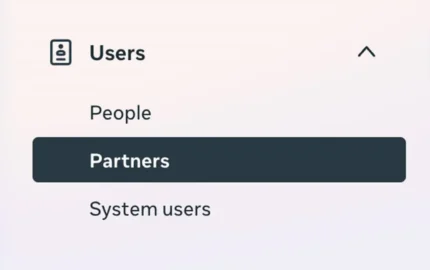
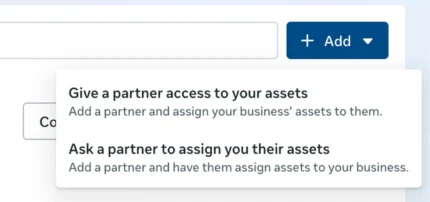
| Partner Access | A way to share an asset between two Meta Business Portfolios, like yours and an agency’s, so they can work with your assets without needing to be added to your specific Meta Business Portfolio. |
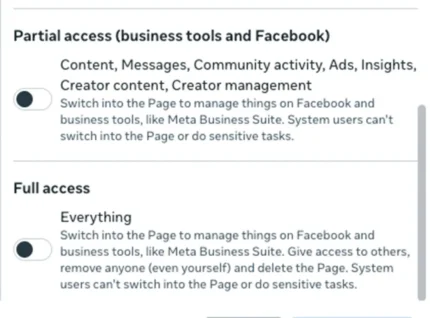
| Partial Access | Lets someone manage specific things on a Page, like content, messages, ads, or insights, without being able to switch into the Page on Facebook itself or touch anything outside those permissions. |
| Full Access | Lets someone do everything: switch into the Page, manage it on Facebook and in business tools, give access to others, remove anyone (including whoever gave them access), and delete assets entirely. |
| Meta Accounts Center | A personal hub at https://accountscenter.meta.com/ where one person links their own Facebook profile, Instagram, and WhatsApp together for shared login and security settings. This is separate from your Meta Business Portfolio. |
What is a Meta Business Portfolio, and how is it different from Meta Business Suite?
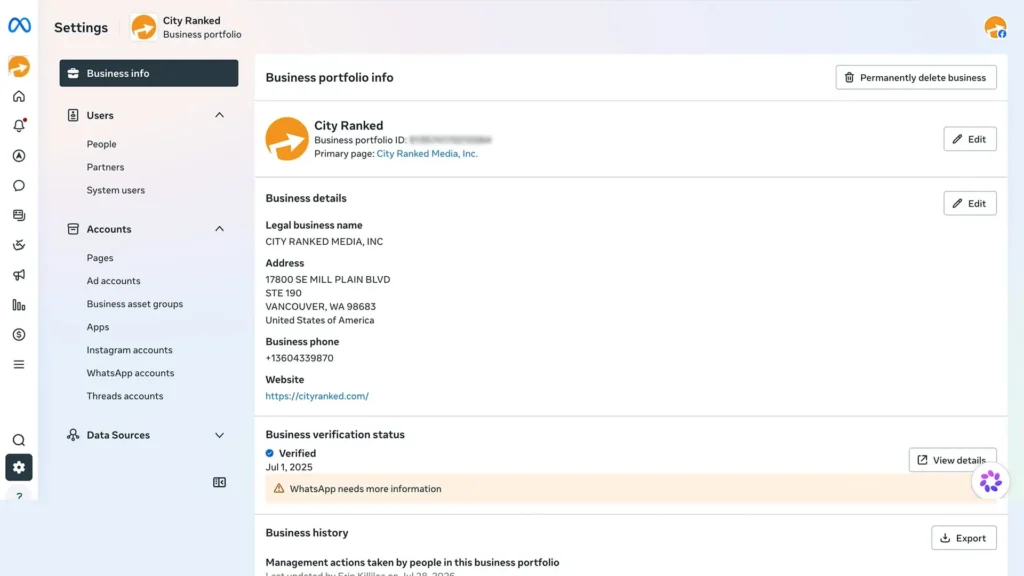
Meta Business Portfolio is the ownership layer. It’s where your Facebook Page, Instagram account, ad account, pixel, and catalog are supposed to live. Think of it as the deed to the house.
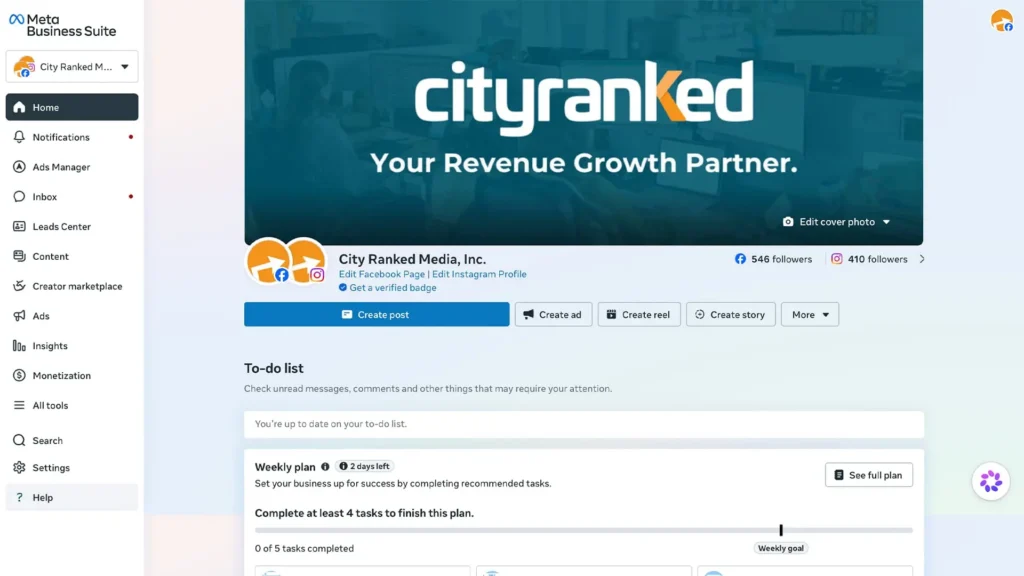
Meta Business Suite is the tool you use day-to-day. Posting content, scheduling, checking messages, glancing at performance. Think of it as living in the house.
The “legacy” way a lot of businesses are still doing this
Many businesses don’t have a Meta Business Portfolio at all, their only access control is the old-style Facebook Page settings. This is usually the first thing we check when we start working with a new client, and you can check it yourself right now if you have admin access to your Page.
- Go to your Facebook Page and click Settings
- Click Page Setup, then Page Access
- Look under People With Facebook Access
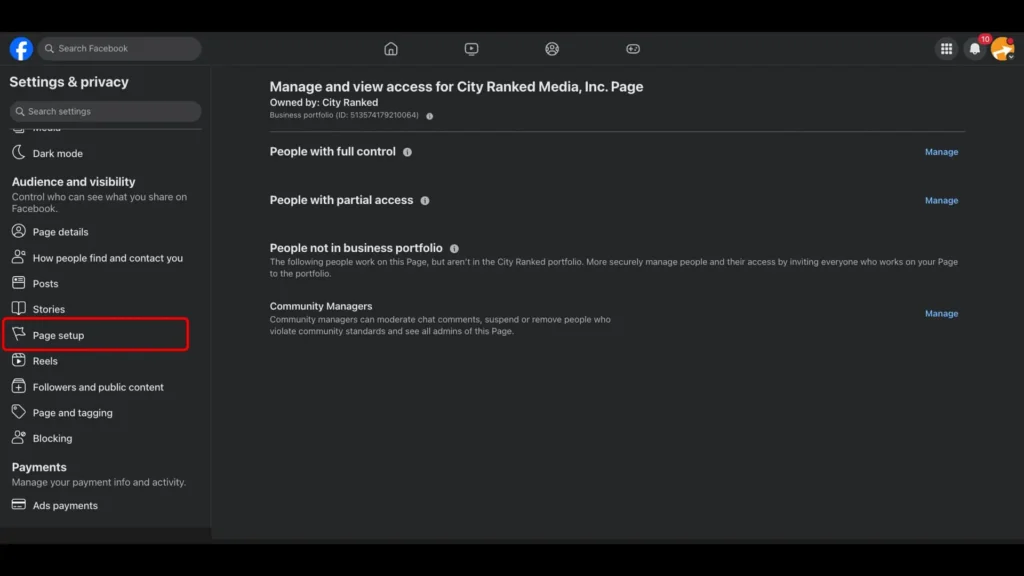
This just adds individual profiles directly to the Page, with no organization and no separation between your Page, ad account, and other assets.
If this is the only access method your Page has, that’s usually the clearest sign your Meta setup was never fully built out, and it’s worth fixing before it becomes a problem.
Why Instagram is a little different
Instagram runs on its own login. Adding it to your Meta Business Portfolio requires the actual Instagram username and password, not just your Facebook profile, plus clearing Instagram’s two-factor authentication if it’s on. In practice, that means handing off Instagram access usually means handing over the actual password, a step that catches businesses off guard when a former employee or past agency set it up and still has that login saved.
There’s also Meta Accounts Center, where one person links their own Facebook profile, Instagram, and WhatsApp together for shared login and unified security settings. It’s a personal level tool, built around one individual’s accounts. Your Meta Business Portfolio is a business level tool, built around what your company owns. Access issues can hide in either one, so it’s worth checking both.
What usually triggers losing access:
- People leave. If your Page was tied to an employee’s personal profile, they can take your access with them when they go.
- Agencies change. If a past partner set up your ad account or pixel under their portfolio, switching agencies can mean starting your data from zero.
What losing access costs you:
- Your data. Your followers, page content, reviews, message history, saved audiences, and ad performance are all tied to whichever accounts they live in.
- Fast recovery. If your account gets flagged or locked, only the portfolio owner can get it back. If that’s not you, you’re waiting on someone else to fix it.
Where to actually look
You don’t need to be technical to check this. Here’s where each asset lives and what a red flag looks like.
| Asset | Where to check it | Red flag |
|---|---|---|
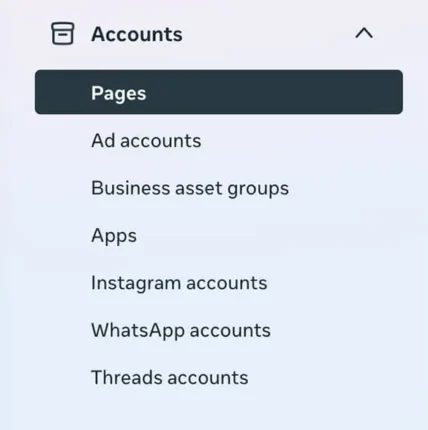
| Facebook Page | Meta Business Portfolio > Accounts > Pages | Page isn’t listed, or only shows up as owned by a different entity |
| Legacy Page access | Facebook Page > Settings > Page Setup > Page Access > People With Facebook Access | This is your only access method, and no Meta Business Portfolio exists at all |
| Instagram account | Meta Business Portfolio > Accounts > Instagram accounts | Account is linked to an old agency or a personal account, not the business |
| Instagram login | Instagram (Mobile or Desktop) or Meta Accounts Center | Nobody at your company knows the password or the 2FA is connected to a former employee |
| Ad account | Meta Business Portfolio > Accounts > Ad accounts | You can’t find it, or it lives inside someone else’s Meta Business Portfolio |
| Admin access | Meta Business Portfolio > People | Former employees or old agency contacts still show up with admin access |
If any of those come back empty, unfamiliar, or full of names you don’t recognize anymore, that’s your answer.
How to get this organized
1. Check if you have a Meta Business Portfolio. If your only access method is the legacy Page setting, start here. If you don’t have one, you can follow the steps to create one here.
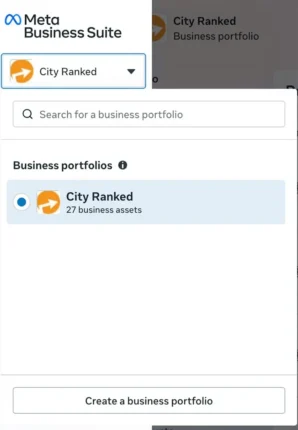
2. Claim your assets in it: Facebook page, Instagram, ad account, etc. Instagram needs its own login credentials, so track those down first.
3. Add people into the Portfolio. You’ll need the email address each person uses to log into the personal Facebook profile (or other account) they use to do business, since that’s how they get added, not a separate “work” login.
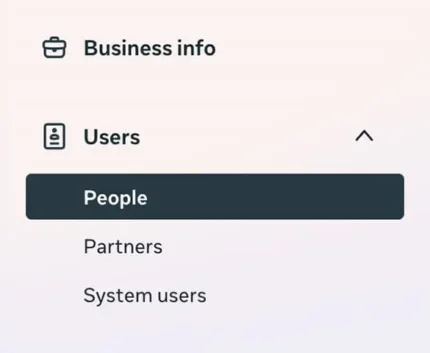
4. Clean up who has access. Limit full admin access to a few decision makers, and give partial access to whoever does the day-to-day work.
5. Give partner access to outside businesses, like an agency, that need to work with your assets without owning them, they’ll need their own Business Portfolio for this to work.
6. Write it down. A simple internal note on who owns what saves hours of guessing next time someone leaves or you switch vendors.
A Little Work Now Saves You a Lot of Headache Later
Meta’s tools are genuinely confusing, even for people who work in them every day. It’s easy to get things set up in a way that works for now but causes problems later, and having someone set it up properly means you’re not the one untangling it when an employee leaves, an agency changes, or an account gets locked. A little work now for a system that runs smoothly going forward.
We help clients get this set up right from the start, so you can stop thinking about it and get back to running your business. Need help with this? Our team’s got you covered.